
Canon PowerShot V10 Review: A Purpose-Built Vlogging Companion
The Canon PowerShot V10 arrived as Canon’s clearest answer yet to the growing demand for a dedicated, pocketable vlogging camera. Rather than adapting an existing point-and-shoot design, Canon built this camera from the ground up around solo content creation. A wide-angle lens, a built-in kickstand, and a proven 1-inch sensor combine into a package that works the moment it comes out of the box. This review walks through every important system on the PowerShot V10, from its sensor to its stand design, so creators can judge whether it fits their workflow. Vloggers and first-time content creators will find every relevant detail covered here.
Canon PowerShot V10 Design and Build Quality
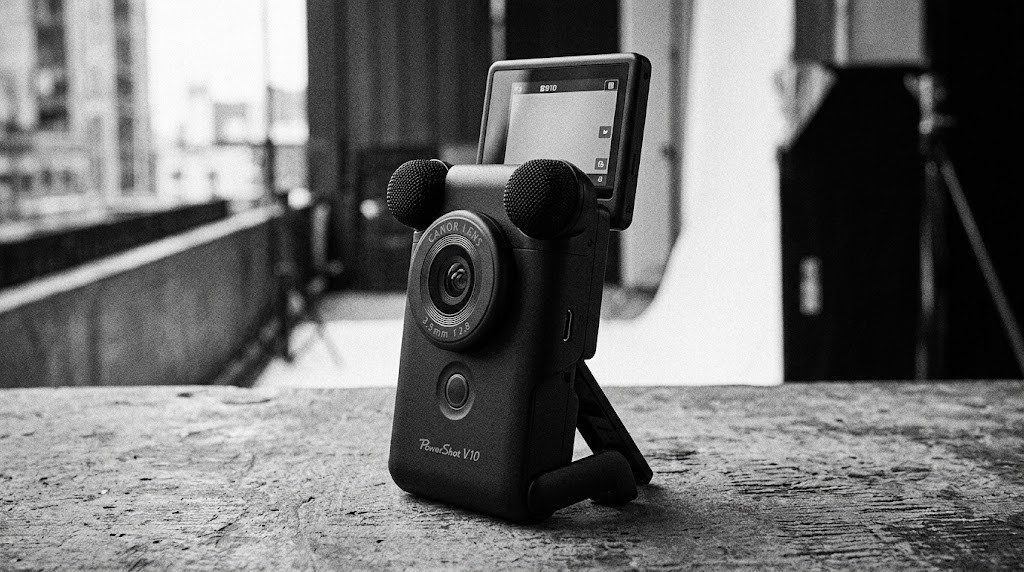
Canon shaped the PowerShot V10 like a small vertical bar rather than a traditional camera, a design choice that immediately signals its vlogging focus. The body measures small enough to slip into a jacket pocket, while weighing light enough to hold steady during extended one-handed recording. A built-in stand flips out from the base at a 30-degree angle, letting the camera stand upright on a table without needing a separate tripod. This stand folds flush against the body when not needed, keeping the overall silhouette clean during travel. Consequently, creators gain a genuinely grab-and-go camera that skips the bulk of a traditional mirrorless vlogging setup.
Canon finishes the PowerShot V10 in either Black or White, both featuring a simple control layout limited to a few essential buttons. A dedicated record button sits prominently on top, glowing red once recording begins so creators can confirm at a glance that footage is rolling. Physical buttons handle power, mode switching, and Wi-Fi pairing, while nearly everything else routes through the touchscreen interface. This minimalist control philosophy keeps the learning curve short for creators who have never used a dedicated camera before. As a result, new users can start recording confidently within minutes of unboxing.
Canon PowerShot V10 Sensor and Image Quality
At the core of the PowerShot V10 sits a 1-inch CMOS sensor with a total pixel count around 20.9 megapixels. Effective resolution shifts depending on the shooting mode, reaching approximately 15.2 megapixels for still photos and 13.1 megapixels during Full HD movie recording. Canon paired this sensor with a DIGIC X processor, the same image processing engine found across several higher-end PowerShot and EOS cameras. This pairing delivers noticeably cleaner images than older Canon compacts using smaller sensors and less capable processors. Consequently, both video and still output from the PowerShot V10 look considerably sharper than typical smartphone footage in similar lighting.
ISO sensitivity ranges from 125 to 3200 during both 4K UHD and Full HD video recording, while still photography extends further up to ISO 12800. This range keeps noise reasonably controlled across everyday shooting conditions, though extreme low-light scenes will still show some grain at the top end. The 1-inch sensor size gives the PowerShot V10 a genuine advantage over smartphone cameras, especially when it comes to dynamic range and color depth. Furthermore, this sensor size allows for shallower depth of field than most phones can produce, adding a more polished look to talking-head footage. Overall, image quality here easily justifies choosing a dedicated camera over a phone for serious content creation.
Canon PowerShot V10 Lens and Field of View
Canon built the PowerShot V10 around a fixed lens tuned specifically for close-range, wide-angle vlogging shots. The lens covers roughly a 19mm equivalent focal length during video recording, translating into a generous 97.5-degree field of view. This wide angle keeps a solo creator’s face and upper body in frame even when the camera sits just an arm’s length away. Maximum aperture reaches f/2.8, letting in enough light for reasonably steady exposure in dimmer indoor settings. Because the lens stays fixed rather than interchangeable, Canon optimized every element specifically for handheld, close-distance vlogging work.
Still photography shifts the effective focal length slightly to approximately 18mm equivalent, accounting for the different sensor crop used during photo capture. This minor shift rarely matters in practice, since most PowerShot V10 owners will use the camera primarily for video rather than dedicated photography. Minimal distortion at this wide angle helps faces stay proportional near the edges of the frame, a detail that cheaper wide-angle cameras often get wrong. As a result, creators recording from an arm’s length away get flattering, natural-looking footage without unwanted fisheye warping.
Canon PowerShot V10 Autofocus and Tracking
Autofocus on the PowerShot V10 relies on face detection paired with a 31-zone tracking system across the frame. The camera locks onto a creator’s face automatically once they step into view, then continues tracking through natural head movement and gestures. Smooth Skin mode applies a gentle skin-smoothing effect directly during recording, a popular feature among beauty and lifestyle creators. Movie IS stabilization helps steady handheld footage during walking shots, reducing the shakiness that often plagues footage from smaller cameras. Auto Movie mode further simplifies the process, automatically adjusting settings so first-time users can focus purely on content rather than technical camera settings.
Canon PowerShot V10 Video Recording Capabilities
Video sits at the center of the PowerShot V10’s entire design philosophy, and the specification sheet reflects that priority clearly. The camera records UHD 4K video at up to 29.97 frames per second, while Full HD recording pushes further to 59.94 frames per second for smoother motion. Recording length can extend up to roughly an hour depending on ambient temperature and the specific resolution selected. Time code settings can be configured directly in the menu, a detail that benefits creators syncing footage with external audio recorders during multi-camera shoots. Consequently, the PowerShot V10 covers most everyday vlogging needs without requiring a more complex camera setup.
Built-in stereo microphones capture reasonably clear audio for casual content, picking up dialogue clearly in typical indoor and outdoor environments. A mini windscreen ships with certain kits, reducing wind noise during outdoor recording sessions considerably. Live streaming support broadcasts directly in Full HD at 30 frames per second, letting creators go live on supported platforms without extra hardware. This built-in streaming capability sets the PowerShot V10 apart from many competing vlogging cameras that require a separate capture card for live broadcasting. Overall, the video toolkit here covers everything a solo creator needs for regular uploads and live sessions alike.
Canon PowerShot V10 Screen and Interface
A 2-inch touchscreen tilts up to 180 degrees, letting creators check their framing while recording themselves from the front. Touch response feels responsive across menu navigation, focus point selection, and playback review. Because the PowerShot V10 skips a viewfinder entirely, the touchscreen serves as the only way to compose and review shots. This tradeoff makes sense given the camera’s compact size and its clear focus on video rather than traditional still photography. As a result, creators accustomed to composing through a screen on their phone will find the transition to this camera comfortable.
Canon PowerShot V10 Connectivity and Sharing
Wi-Fi and Bluetooth connectivity work together through the free Canon Camera Connect app, letting creators transfer footage directly to a smartphone. This wireless workflow speeds up the process of editing and posting content without needing a computer at all. A USB-C port handles both charging and data transfer, aligning with the same cable most creators already carry for their phone. An HDMI micro output also ships on the body, useful for creators who want to preview footage on a larger external screen. Together, these connectivity options make the PowerShot V10 fit smoothly into a modern, mobile-first content creation workflow.
Canon PowerShot V10 Battery Life and Power Management
Battery life on the PowerShot V10 supports roughly an hour of continuous recording, depending on resolution and ambient temperature during the session. USB-C charging means a portable power bank can extend a shooting day considerably without needing a dedicated charging dock nearby. Creators planning longer sessions, such as extended livestreams or all-day vlogging, should plan around this runtime limitation carefully. Because the battery sits internal rather than swappable, recharging mid-shoot takes longer than simply popping in a spare cell. Even so, most casual vlogging sessions fall comfortably within the camera’s available recording window.
Canon PowerShot V10 Weather Resistance and Durability
Canon did not build any weather sealing into the PowerShot V10, so creators should take normal care around dust, moisture, and rain. This omission makes sense given the camera’s compact, lightweight design and its price positioning below many weather-sealed mirrorless options. Outdoor creators working in unpredictable weather should consider a simple protective case or cover for extra peace of mind. The lack of a viewfinder and any sealing reinforces that Canon built this camera specifically for casual, everyday vlogging rather than demanding professional field work. Understanding this limitation upfront helps set realistic expectations before heading out for an outdoor shoot.
Canon PowerShot V10 Learning Curve For New Creators
Photographers and creators moving straight from smartphone recording will find the transition to the PowerShot V10 remarkably smooth. Menu options stay limited by design, avoiding the overwhelming settings lists found on more advanced mirrorless cameras. Auto Movie mode handles exposure and focus automatically, letting brand-new users start recording usable footage on their very first try. Most creators report feeling fully comfortable with the camera’s controls within their first few recording sessions. This gentle learning curve makes the PowerShot V10 an approachable entry point for anyone starting their content creation journey from scratch. Even creators who eventually graduate to more advanced mirrorless gear often keep the PowerShot V10 around as a lightweight backup for casual, everyday recording.
Canon PowerShot V10 Price and Value
Canon launched the PowerShot V10 with a suggested retail price around $429.99, positioning it as an accessible entry point into dedicated vlogging gear. Various kits bundle in accessories like a camera cage, wrist strap, mini windscreen, and fabric cover, adding practical value for new creators. Compared against buying a smartphone gimbal setup or a more expensive mirrorless vlogging kit, the PowerShot V10 keeps the total investment relatively low. Creators upgrading directly from smartphone footage will notice a meaningful jump in image quality and audio clarity for a modest cost increase. Given its focused feature set, the price feels reasonable for anyone serious about starting a consistent content creation habit. Compared to the cost of a smartphone upgrade purely for better video quality, the PowerShot V10 often ends up the more practical purchase for dedicated creators. That value proposition only strengthens further once bundled kit accessories get factored into the overall comparison.
Canon PowerShot V10 Real World Shooting Scenarios
Solo creators recording talking-head content will find the wide field of view especially useful when working in small apartments or home offices. The built-in stand lets a creator set the camera on a desk or shelf, then step back into frame without needing a tripod or phone stand nearby. Face tracking keeps focus locked during natural hand gestures and head movement, a common challenge for creators recording tutorials or reaction content. Because the camera starts recording with a single button press, spontaneous ideas rarely get lost while fumbling through menus or settings. These traits combine to make the PowerShot V10 a genuinely practical daily-use camera for consistent content creators.
Travel vloggers benefit from the compact size, since the camera slips into a pocket or small bag without adding noticeable bulk during long days of walking. The wide-angle lens captures both the creator and surrounding scenery in one frame, a common requirement for travel-style narration shots. Livestream creators covering unboxings, Q&A sessions, or casual chats gain a straightforward path to broadcasting without renting or buying separate streaming hardware. Meanwhile, creators building a consistent posting schedule appreciate how quickly footage transfers to a phone for same-day editing and uploading. Across these everyday scenarios, the PowerShot V10 consistently simplifies the recording process rather than adding extra complexity. Creators juggling multiple platforms, from short-form clips to longer tutorials, appreciate having one small camera that adapts to nearly every casual filming situation without extra setup time.
Canon PowerShot V10 Accessories and Kit Options
Canon and third-party retailers offer several bundled kits that pair the PowerShot V10 with useful vlogging accessories. A camera cage adds mounting points for external microphones, lights, or additional grips during more involved productions. A mini windscreen reduces wind noise significantly during outdoor recording, an essential addition for anyone filming near traffic or open spaces. The included wrist strap helps prevent accidental drops during handheld walking shots, while a fabric cover protects the camera body during transport in a bag. Creators building out a more complete kit should consider these accessories early, since they address common frustrations before they interrupt an actual shoot. Starting with just the wrist strap and windscreen covers most casual needs, while the camera cage becomes worthwhile once external microphones or lights enter the workflow. Investing gradually in these add-ons lets creators scale their setup naturally as their content and audience grow over time.
Canon PowerShot V10 Compared To Rival Vlogging Cameras
Creators shopping in this category often compare the PowerShot V10 against Sony’s ZV-1 series and DJI’s Osmo Pocket line. Sony’s ZV-1 offers a zoom lens and slightly larger control set, appealing to creators who want more manual flexibility over their footage. DJI’s Osmo Pocket relies on a built-in gimbal for exceptional stabilization, though its smaller sensor cannot match the PowerShot V10 in low-light image quality. The PowerShot V10 instead prioritizes simplicity and a genuinely wide selfie-friendly field of view over zoom range or gimbal-based stabilization. Creators choosing between these options should weigh whether they value zoom flexibility, stabilization technology, or straightforward wide-angle framing most for their specific content style.
Canon PowerShot V10 Audio Quality For Content Creators
Built-in stereo microphones handle everyday dialogue capture reasonably well across typical indoor recording environments. Outdoor recording introduces more challenge, since wind and ambient noise pick up more easily on a small camera without any external microphone attached. The included mini windscreen, available in certain kits, noticeably reduces this wind interference during outdoor walking shots or narration. Creators recording more polished content, such as tutorials or scripted videos, should still consider an external microphone connected through the camera cage accessory for cleaner results. For casual daily vlogging, however, the built-in microphones capture perfectly usable audio without any additional gear required. Most viewers watching everyday vlog content will not notice a meaningful difference between built-in and external audio unless recording in genuinely noisy environments.
Canon PowerShot V10 Pros and Cons
The wide-angle lens, built-in kickstand, and proven 1-inch sensor stand out as the biggest strengths of this camera. Reliable face tracking and a genuinely simple interface also deserve praise, since new creators can start recording confidently right away. On the downside, the lack of a viewfinder and any weather sealing limits its usefulness for more demanding outdoor shoots. Battery life, while adequate for typical sessions, will still require planning around longer recording days. Weighing these factors together, the PowerShot V10 earns strong marks specifically for creators who want a simple, dedicated vlogging tool rather than a full-featured camera system.
Who Should Buy The Canon PowerShot V10
Creators just starting a YouTube channel or social media presence will find the PowerShot V10 an approachable first dedicated camera. Solo vloggers who need reliable face tracking and a flattering wide-angle view benefit directly from this camera’s core design focus. Travelers who want a lightweight, grab-and-go option for daily video logs will appreciate how easily it fits into a small bag. Live streamers benefit from built-in Full HD streaming support, skipping the need for extra capture hardware. However, creators who need interchangeable lenses, weather sealing, or extended battery life should consider a more advanced mirrorless vlogging setup instead.
Frequently Asked Questions About The Canon PowerShot V10
What sensor does the Canon PowerShot V10 use? It uses a 1-inch CMOS sensor with approximately 20.9 total megapixels, paired with a DIGIC X processor.
Can the Canon PowerShot V10 live stream? Yes, the camera supports live streaming in Full HD at 30 frames per second through supported platforms.
Does the Canon PowerShot V10 have a viewfinder? No, the camera relies entirely on its 2-inch tilting touchscreen for composing and reviewing shots.
How long can the Canon PowerShot V10 record continuously? The camera supports up to approximately one hour of continuous recording, depending on resolution and temperature.
Final Verdict on the Canon PowerShot V10
Canon built the PowerShot V10 as a genuinely focused vlogging tool rather than a general-purpose compact camera. The wide-angle lens, built-in stand, and dependable 1-inch sensor combine into a package that works well for solo creators from the very first recording session. Minor tradeoffs around weather sealing and battery life feel reasonable given the camera’s accessible price and clear target audience. For creators who want a simple, dedicated device that handles everyday vlogging without a steep learning curve, the PowerShot V10 deserves serious consideration. Check current pricing and full specifications directly through Canon’s official PowerShot V10 product page or through B&H Photo before making a final decision.
Read More From Altbuzz
Camera news moves fast, and Altbuzz covers every major release the moment it drops. Head over to Altbuzz Media for more in-depth camera reviews, rumor roundups, and buying guides. Our team breaks down sensor technology, lens performance, and real-world video output across every brand worth watching. New comparisons and hands-on tests get published regularly, so bookmark the site for updates.
Subscribe To Our YouTube Channel
Video reviews often reveal details that photos and text simply cannot capture. Subscribe to the Altbuzz YouTube channel for hands-on camera tests, lens comparisons, and first-look coverage of upcoming releases. New videos go live regularly, covering everything from budget vlogging cameras to professional full-frame systems. Turn on notifications so you never miss a new upload.