
10 Camera Buying Mistakes to Avoid in 2027 (Before You Spend Thousands)
Camera buying mistakes rarely happen on the front page of a spec sheet. They hide in the footnotes. The number that convinced you to buy may not mean what you think it means. A maximum burst rate can hide a resolution limit. A video mode can crop the sensor. Stabilization cannot freeze a moving subject. Weather sealing does not make a camera waterproof.
You may plan to spend two, three or even five thousand dollars in 2027. This guide helps you protect that money. We read the fine print so you do not learn it the expensive way. Each mistake below comes with a real example, a plain explanation and a simple fix.
At the end, you will find a ten-question audit you can use at any checkout page.
The 10 Camera Buying Mistakes at a Glance
| # | Mistake | The Question to Ask |
|---|---|---|
| 10 | Shopping by lineup instead of today’s price | What does each body cost today? |
| 9 | Believing the biggest fps number | At what resolution and file type? |
| 8 | Assuming video modes use the whole sensor | Is the mode cropped? |
| 7 | Ignoring what premium video modes cost to use | What does one hour of footage do to my storage? |
| 6 | Turning full frame into crop by accident | What area of the sensor does my lens use? |
| 5 | Expecting IBIS to freeze a moving subject | Is camera shake really my problem? |
| 4 | Treating weather resistance like waterproofing | What does the maker actually promise? |
| 3 | Ignoring the shutter the camera really has | Which shutter modes exist, and what do they cost? |
| 2 | Buying around a rumor | Is the next camera official or only reported? |
| 1 | Switching systems because one camera is winning | Is the new body worth rebuilding my whole kit? |
Specs and prices change quickly. Check every figure against the manufacturer’s page or a major retailer before you buy.
Mistake 10: Shopping by Lineup Instead of Today’s Price
This mistake starts before you read a single specification. You shop from the lineup in your head instead of the price on the screen.
Why Launch Hierarchy Misleads You
Every brand builds a tidy ladder. There is an entry model, a middle model and the one you save up for. You learn those rungs at launch, and the gaps between them start to feel permanent. They are not permanent. Rebates arrive. Retailers clear older stock. Refurbished units appear. A gap that looked huge in the launch coverage can shrink into something a good lens could fill.
A Real Example From a Nikon Sale
In late October, B&H Photo ran Nikon fall savings. The sale listed the Nikon Z6 III body at just under $2,000. It listed the Nikon Z5 II at about $1,600. At regular prices, those two cameras sat roughly $850 apart. During the sale, the gap fell to about $400. The cameras and specifications stayed the same. The decision changed completely.
Sale prices end, so confirm the current numbers on the retailer’s page.
Keep New, Refurbished and Used Separate
Notice what that example shows. It shows new, in-the-box sale pricing. Compare it with a used listing, and the comparison stops being honest. Keep new, refurbished and healthy used cameras in separate columns.
A smaller gap does not automatically crown the bigger body. If the cheaper camera does everything you need, that $400 may belong in your lens budget. The mistake is not choosing the lower tier. The mistake is letting launch-day hierarchy make the call for you.
How to Avoid It
Write down four things before you buy:
- Today’s price for your body
- Today’s price for the next model up
- The price of the lens you will want
- Whether a successor looks close
Sales end. Do the math on the day you pay.
Mistake 9: Believing the Biggest FPS Number
The biggest frames-per-second figure on the box sells a lot of cameras. It also misleads a lot of buyers.
The Nikon Z6 III Burst Example
Take the Nikon Z6 III, because Nikon documents it clearly. The headline is up to 120fps, and that figure is real. But follow the footnotes. The 120fps mode drops the image to about 10MP and uses a cropped DX area. The camera’s full sensor has 24.5MP. At full resolution, the burst rates are lower, and raw files run slower than JPEG files. Check Nikon’s manual for the exact numbers on each setting.
Why 120fps Is Not a Trick
Nikon is not hiding anything. For a bird leaving a branch or the decisive moment in a sprint, 10MP of the right instant beats 24MP of the wrong one. Nikon also offers pre-release capture in its high-speed modes. That feature records frames from before you fully press the shutter. It gives you a real edge in unpredictable action.
The mistake is lining up that 120fps figure against another camera’s full-resolution raw rate. Those two numbers do not measure the same thing.
The Questions Behind Every Burst Spec
The real question is longer than the spec. Ask yourself:
- How many frames per second at what resolution?
- In which file format?
- With which shutter?
- For how long before the buffer fills?
- What do autofocus and exposure do during the burst?
If a number cannot survive those questions, you cannot shop with it.
Mistake 8: Assuming the Headline Video Mode Uses the Whole Sensor
Some video modes are completely real and still not what you pictured. The 4K at 120fps mode on the Sony A7 V is a good example.
The Sony A7 V Crop Explained
Sony is upfront about this mode. Full-width 4K tops out at 60fps. The camera builds that footage from a 7K source with full-pixel readout and no pixel binning. Go up to 120fps, and the camera moves to the APS-C, or Super 35mm, area of the sensor. Sony describes the result as a reduced angle of view. The footage is not fake 4K. It is simply a tighter frame.
What a 1.5x Crop Does to Your Lens
That tighter frame is the whole story. At roughly 1.5x, a 24mm lens frames more like a 36mm lens in slow motion. Now picture a tight hallway, a wedding dance floor or a crowded travel street. The slow-motion shot may not fit the way the regular shot did.
A wildlife or sports shooter might call the same crop a gift. It adds free reach from the lens already in the bag. Neither reaction is wrong. It depends on what you plan to film.
Other Video Conditions to Check
Crop is only the first condition. Also ask:
- Is the mode oversampled or binned?
- What codec and bit depth does it record?
- How long does it run before heat becomes a problem?
- Which memory cards does it need?
Reviewers also note that full-width 60fps involves a menu setting called Angle of View Priority. That detail belongs to one camera. Read the conditions for the exact body in your cart.
A video spec is a full sentence. Read all of it.
Mistake 7: Ignoring What Premium Video Modes Cost to Use
This mistake hits the buyer who does plan to use the big video modes. That buyer prices the camera and forgets everything the modes need.
The Canon EOS R5 Mark II Storage Math
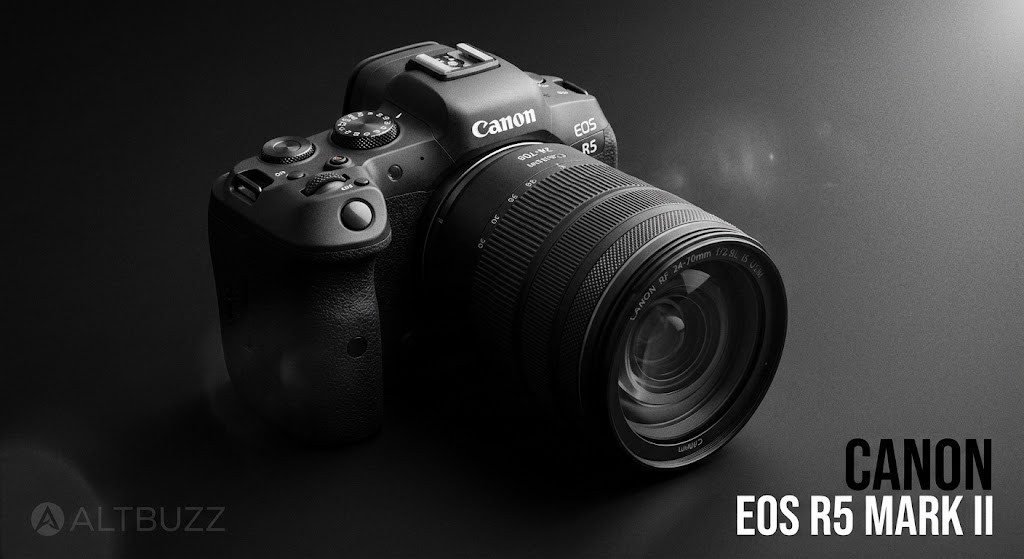
Start with the Canon EOS R5 Mark II. Canon’s tables list some raw recording at about 2,600Mbps. That works out to roughly 18,600MB for every minute. Stay with that figure for a second. A little over 18GB a minute becomes a little over 1TB for a single hour.
Now add a backup. Keep one copy on the working drive and another as insurance. One hour of footage has quietly grown past 2TB before you cut a single frame.
Canon points to fast CFexpress Type B cards for its demanding modes. Lighter modes ask for less. Do not assume every setting carries the same demand. But if raw is the reason you are buying, the card, the reader, the drive, the backup and the computer all belong on the receipt.
The Panasonic Lumix S5IIX ProRes Example
Now look at the other side. Panasonic documents the Lumix S5IIX recording ProRes 422 HQ at up to 1.9Gbps. It records straight to a compatible external USB SSD. Panasonic recommends drives it has confirmed, and the drive can be up to 2TB.
The arithmetic is simple. A full 2TB drive holds a little over two hours at that peak rate, before audio and file overhead. There are conditions too. High frame rates above 60fps cannot go to the external drive. Recording to the SSD also means the SD card does not record at the same moment.
Storage Versus Editing Power
ProRes is popular for a reason. It is designed to be easy to edit. That can cut down on transcoding and spare an older computer. The price is file size.
A lighter codec saves storage and shifts the burden to the editing machine. Neither choice is a mistake. The mistake is discovering the trade after you pay for the camera.
How to Avoid It
Pick the mode you actually want. Work out what one hour of it does to your storage and backups. Then let that number sit next to the price of the camera.
Mistake 6: Buying Full Frame, Then Accidentally Turning It Into Crop
You can buy a full-frame body and quietly turn it back into a crop camera.
The Nikon DX Lens on FX Body Example
Say you shoot Nikon APS-C. You already own your DX lenses, and you like them. A full-frame body mounts them without complaint. The upgrade plan writes itself, right up until you check which part of the sensor is recording.
Nikon lists the Z5 II with a 24.5MP FX sensor. Put a DX lens on it, and the camera uses the DX image area. That area measures 3984 by 2656 pixels, or about 10.6MP. You get less than half the resolution you paid for.
The lens did not change. Its focal length is exactly what it always was. The camera simply uses a smaller piece of the sensor. That changes the angle of view and the pixel count.
When DX Mode Still Makes Sense
Is that a disaster? Not at all. It can be a sensible bridge. You can run your DX lenses while you save for full-frame glass. You lose nothing you were not already shooting. Plenty of photographers will find 10MP enough for how they publish.
I would push back on one thing only. Do not budget as though your crop lenses are already full-frame lenses.
Check Your Own System
Nobody needs to sell every lens before moving up. The right plan depends on which lenses you use and whether you can live with lower resolution. Other systems use the same idea. Check the exact numbers for the exact camera before it goes into your plan.
Mistake 5: Expecting IBIS to Freeze a Moving Subject
More stabilization will not fix every blurry photo.
The Dancer Problem
Picture a dancer under dim stage lighting. You buy a body with the latest in-body image stabilization, or IBIS. You shoot the next show. The dancer is still smeared across the frame. What happened?
What Stabilization Actually Fixes
Stabilization solves one kind of blur, and that blur is yours. Canon describes its image stabilization as compensation for camera shake. Camera shake means the small movements of your hands. Stabilization cannot make a subject stand still.
Look at the frame. If the background looks sharp and the dancer does not, the camera was steady and the subject was not. Another stop of stabilization will not change that. The cure lives somewhere else:
- A faster shutter speed
- More light
- A wider aperture
- A higher ISO
- A technique that anticipates the movement
Where IBIS Earns Its Place
None of this means IBIS is overrated. It earns its place on still scenes at slower shutter speeds. It helps in handheld video. It also helps with long lenses in poor light. A single frame can even suffer from both kinds of blur at once. The two blurs have different causes and different fixes.
How to Avoid It
Look at your failures before you pay extra for stabilization. Is everything soft, or only the thing that moved?
Mistake 4: Treating Weather Resistance Like Waterproofing
This mistake carries a very physical price tag. Weather resistance is not the same promise as waterproof.
Two Different Promises
Weather resistance means the maker added sealing to make dust and moisture harder to get in. Waterproof means the equipment is built to be wet. Camera makers usually choose modest wording. Sony, for example, describes a dust and moisture resistant design. It then states that the design is not guaranteed to be 100 percent dust and moisture proof.
That is Sony’s language. Read the documentation for the exact body and lens you own. Do not assume every brand says the same thing.
Protection Works as a System
The body is only one part of the system. The lens has its own sealing, or it has none. An adapter adds a joint. Terminal covers, card doors and battery doors only help when you close them. One of Sony’s flash documents even says the level of resistance varies with the body it attaches to. How you handle the equipment matters as much as how the maker built it.
Rugged Cameras Are a Different Category
Tough-style compact cameras are built for a different job. Treat an ordinary interchangeable-lens body like one of those, and you ask it for something it never promised.
Practical Rules for Wet Weather
None of this means your camera belongs in a bag at the first cloud. Sealing lowers risk, and that has real value. Use a rain cover. Keep every door shut. Wipe the camera down afterward. Think of weather resistance as extra margin in bad conditions. Do not treat it as permission to ignore them.
Mistake 3: Ignoring the Shutter the Camera Actually Has
Nobody puts the shutter in the thumbnail. It still decides how a camera behaves.
The Canon EOS R8 Mark II Example
A figure like 40fps sounds like a sports camera. Look at Canon’s new EOS R8 Mark II. It offers electronic first-curtain and fully electronic shutter modes. Electronic first-curtain tops out at 6fps. Fully electronic reaches 40fps. Canon also states that flash is not supported with the fully electronic shutter.
Read that again. The fastest mode and the flash mode are different modes. A wedding photographer who uses flash cannot reach the headline 40fps in the moments that matter. Buffer depth adds another limit. One retail listing linked to Canon puts the buffer at 73 raw frames at 40fps. That is a little under two seconds of shooting.
Rolling Shutter and Flicker Banding
There is a second layer. An electronic shutter works with the CMOS sensor as a rolling shutter. The sensor reads out line by line, not all at once. A fast-moving subject can lean or bend as the camera reads the lines. A propeller can look wrong.
Some artificial lighting adds another problem. Flickering light is common at indoor venues. It can produce banding in electronic shooting. Canon’s older R8 documentation warns about this and notes that continuous shooting can slow down when the camera detects flicker. A newer camera may behave differently, so do not assume. Check it.
Mirrorless Is Not the Problem
This point is not a criticism of mirrorless cameras as a whole. Plenty of them keep a mechanical shutter. Some have sensors that read out so quickly that the problems shrink dramatically.
The point is narrower. Do you shoot indoor sports under LED lighting, fast action or events with flash? Then list every shutter mode the camera has. Write down what each mode gives up.
Mistake 2: Making the Purchase Around a Rumor
You can also buy around a camera that does not exist yet. That mistake costs time more than money.
The Canon EOS R7 Mark II Rumor Trail

Take Canon’s rumored EOS R7 Mark II. Over the past year, reports named a series of different windows. First came the second half of 2025. Then came the first half of 2026, and later late spring or early summer. By late April, some sources said the camera might not arrive this year at all. More recent reports point to early 2027, and one outlet leans toward a launch before the CP+ show in late February.
As far as we can find, Canon has not officially announced this camera. Every one of those dates came from sources, not from Canon. Treat all of them as unconfirmed.
The Four Layers of Camera Rumors
That trail of moving dates teaches the real lesson. A rumor comes in layers.
- Official development: The company itself says something.
- Credible reporting: Sources with a track record report it. This is useful but not guaranteed.
- Weak speculation: Someone guesses with little support.
- Editorial inference: Writers connect dots. That includes us whenever we guess.
The Two Opposite Rumor Mistakes
Rumors cause two opposite mistakes. In the first, a successor rumor makes your current camera feel obsolete overnight. You rush into a purchase or panic-sell. In the second, you wait, and the date keeps moving. Months pass without a single photograph you wanted to take.
When a Rumor Should Move Your Decision
A rumor should move your decision only in one situation. Your current camera still works. You have no deadline. The reported successor targets one specific thing you actually lack.
Do you need a camera for paid work, travel, a family event or a project happening now? Then a weak rumor rarely justifies months without a camera. That is why Altbuzz separates what is official from what is reported in every upcoming-camera video.
One more detail matters. Rumors about that Canon body have included an all-electronic shutter. After mistake number three, you know exactly what to check if that rumor turns out to be true.
Mistake 1: Switching Systems Because One Camera Is Winning Right Now
This mistake carries the biggest bill. You switch systems because one camera is winning right now.
Brands Leapfrog Each Other
Brands pass each other all the time. This year’s autofocus champion, resolution leader or video favorite can lose its place in the next cycle. A body can lead its category and still not justify tearing down a working system. The body is the smallest part of what you would replace.
The Full Cost of a System Switch
Start the count with lenses. Then add the flash system, batteries and chargers. Add remotes, plates and cages. Add adapters, cards and drives. Include the editing workflow built around your current files.
Then add the friction of leaving your old kit. You face depreciation, marketplace fees and the timing of selling and buying. You also face a real risk. The competitor may lose its lead before you finish paying for the move.
Nobody can honestly give you one universal number for this. For a photographer with several lenses and a flash setup, thousands of dollars is not a stretch.
Loyalty Is Not a Virtue
None of this means brand loyalty is a virtue. Switching can be completely right. Suppose the new system fixes a limit that keeps costing you jobs, shots or creative freedom. Then you have a purchase with a real reason behind it. The mistake is switching for a chart.
Even Adapters Have Limits
Staying inside one brand has edges too. Nikon says its FTZ II adapter supports auto exposure with roughly 360 F-mount lenses. Full autofocus and auto exposure belong to 94 types of AF-S, AF-P and AF-I lenses. Older screw-drive autofocus designs fall outside that group, and they do not autofocus on the adapter. A lens can mount and still not behave the way you remember.
The Only Question That Matters
Do not ask whether the other camera is better. Ask whether it is better enough, for the pictures you make, to justify rebuilding something that already works. Sometimes the answer is yes. A body can win every comparison chart and still lose the purchase once you add everything attached to it.
The Pre-Purchase Audit: 10 Questions Before You Pay
Use this checklist at any checkout page. It turns all ten mistakes into one routine.
- Price: What does this exact body cost today? What do the models above and below it cost today?
- Burst: At the maximum rate, what resolution, file type, shutter mode and buffer apply? What is autofocus doing?
- Video: Is the mode you want full-width or cropped? What codec, card and heat limits come with it?
- Workflow: What does one hour of that recording do to your storage and backups?
- Lenses: Does the glass you own cover the new sensor? Does it keep the resolution and functions you expect?
- Stabilization: Does camera shake really ruin your current photos?
- Environment: What protection does the manufacturer actually promise?
- Shutter: Which shutter modes exist? What do they change for flash, flicker and moving subjects?
- Timing: Is the next camera official, reported or just plausible?
- System: Is the new body better enough to justify replacing everything built around the old one?
Ten questions mark ten places where money tends to leak. The expensive mistakes rarely sit on the front page. They live in the condition, the footnote, the workflow and the system around the camera.
Frequently Asked Questions
What are the most common camera buying mistakes?
The most common mistakes involve trusting headline specs. Buyers believe the biggest burst rate, assume video modes use the full sensor, and forget storage costs. Many also ignore which shutter modes a camera really offers.
Is a higher fps number always better?
No. A high fps figure often applies only at reduced resolution, in a cropped area or in one file format. Always check the resolution, file type, shutter mode and buffer limit behind the number.
Does IBIS stop motion blur from a moving subject?
No. IBIS reduces blur from your own hand movement. It cannot freeze a moving subject. A faster shutter speed, more light or better timing solves subject blur.
Is weather sealing the same as waterproof?
No. Weather sealing makes dust and moisture harder to get in. It does not make a camera waterproof. Manufacturers often state that their sealing is not a guarantee against all dust and moisture.
Should I wait for a rumored camera?
Wait only if your current camera still works, you have no deadline and the rumored model fixes something you truly lack. Rumored dates often move, and waiting can cost months of shooting.
How much storage does 8K raw video need?
It needs a lot. Canon lists some raw modes at roughly 2,600Mbps, which is a little over 1TB per hour. Add a backup copy, and you pass 2TB for one hour of footage.
Is it worth switching camera systems for one great body?
Rarely. Lenses, flashes, batteries, adapters and workflow all add to the cost. Switch only when the new system fixes a limit that keeps costing you real work.
Final Thoughts: Buy the Conditions, Not the Headline
A camera spec is never one number. It is a sentence with conditions attached. Read the whole sentence before you pay. Check today’s price, the real burst limits, the true video crop, the storage bill, the sensor area your lenses use, the shutter modes and the cost of your whole system. Do that, and you will avoid the mistakes that cost other buyers the most.
Read More from Altbuzz
Want more buying advice that explains the conditions behind the numbers? Explore these Altbuzz guides.
- Best Leica Cameras in 2027: Which One Wins?
- Top 3 Cameras to Avoid in 2026
- Canon EOS R7 Mark II Rumors: What We Know
- All Altbuzz Camera Reviews
Subscribe to the Altbuzz YouTube Channel
Prefer watching to reading? Our video version covers all ten mistakes with extra examples. Subscribe to Altbuzz on YouTube for camera buying guides, rankings and rumor coverage. You can also find more at altbuzzmedia.com.
Which mistake costs buyers the most: the shutter, the crop or the system switch? Tell us in the comments. Then make your guess on the Canon EOS R7 Mark II. Will it arrive in the first half of 2027, sooner or later? When Canon finally says something official, we will see who got it right.