
Insta360 GO Ultra Full Review: Tiny 4K Camera Tested
The Insta360 GO Ultra is the most capable version of Insta360’s magnetic action camera series yet. Insta360 launched it in August 2025. It weighs just 53 grams. However, it delivers 4K video at 60fps, supports microSD cards up to 2TB, and packs a 1/1.28-inch sensor that is 221% larger than the GO 3S sensor.
The Insta360 GO Ultra starts at $449. This places it directly alongside the Insta360 Ace Pro 2 and above the GoPro Hero 13 Black. Consequently, it must justify premium pricing through both its performance and its unique tiny form factor advantages.
Release Date and Market Position
When Did Insta360 Launch the GO Ultra?
Insta360 launched the GO Ultra in August 2025. It replaced the GO 3S as the flagship of the GO camera series. Additionally, it expanded the GO series’ ambitions from a niche accessory camera into a fully premium action camera competing directly with Insta360’s own Ace Pro 2.
What Does It Cost?
The Insta360 GO Ultra retails at $449 for the standard bundle. This directly matches the Ace Pro 2. Furthermore, it sits above the GoPro Hero 13 Black and the DJI Action 5 Pro in pricing terms. The premium cost demands that the tiny form factor and modular design deliver genuine advantages over less expensive competitors.
How Does the GO Series Identity Carry Over?
The GO series has always stood for one core capability. It provides a tiny magnetic camera that clips onto clothing, fits into tight spaces, and captures genuine hands-free POV footage. The GO Ultra preserves this identity completely. Additionally, it adds the sensor quality and recording flexibility that professional creators have been requesting since the original GO launched.
What Changed From the GO 3S?
The most significant changes are the sensor size upgrade from 1/2.3-inch to 1/1.28-inch and the addition of microSD card storage. Beyond these two core changes, the GO Ultra also improves battery life, adds the new Action Pod with a larger screen, and updates the stabilization algorithm. Furthermore, the form factor shifted from an oblong pill shape to a square body.
How Does It Compare to the Ace Pro 2?
The Ace Pro 2 delivers sharper and more detailed footage in low-light conditions based on independent testing. However, the GO Ultra offers unique advantages the Ace Pro 2 cannot match. The tiny wearable form factor, magnetic mounting versatility, and modular operation mode are all exclusive to the GO Ultra platform. Furthermore, neither camera clearly dominates the other across all shooting scenarios.
Specifications Table
| Feature | Details |
|---|---|
| Sensor | 1/1.28-inch CMOS |
| Sensor Area Increase | 221% larger than GO 3S |
| Lens Aperture | f/2.8 ultra-wide |
| Field of View | 156 degrees |
| Max Video | 4K at 60fps |
| Active HDR Video | 4K HDR at 60fps, Active HDR at 4K/30fps |
| Slow Motion | 1080p at 240fps |
| Open Gate | FreeFrame 3840 x 2880 (4:3) |
| Low-Light Mode | PureVideo AI processing mode |
| Still Photos | 50MP |
| AI Processor | 5nm chip |
| Stabilization | FlowState AI with horizon leveling |
| Horizon Leveling | 45 and 360-degree modes |
| Camera Battery | 500mAh, approximately 70 minutes |
| Action Pod Battery | 1450mAh, approximately 130 additional minutes |
| Total Combined Runtime | Up to 200 minutes |
| Fast Charge Camera | 0 to 80% in 12 minutes |
| Fast Charge Pod | 0 to 80% in 18 minutes |
| Storage | MicroSD up to 2TB |
| Action Pod Screen | 2.5-inch flip-down touchscreen |
| Camera Weight | 53g standalone |
| Combined Weight | 108g with Action Pod |
| Mounting | Magnetic rear surface |
| Pendant Tilt | 15-degree adjustable magnetic |
| Colors | Midnight Black, Arctic White |
| Price | $449 standard bundle |
Sensor and Image Quality
How Big Is the Upgrade From GO 3S?
The GO 3S used a 1/2.3-inch sensor. The GO Ultra jumps to 1/1.28 inches. This represents a 221% increase in total sensor area. A larger sensor captures significantly more light per pixel. As a result, dynamic range improves noticeably and noise performance at higher sensitivities becomes meaningfully better across all shooting conditions.
How Does It Perform in Daylight?
Daylight footage from the GO Ultra is genuinely impressive for an action camera at this size. Colors are vibrant and accurate. Detail rendering at the center of the wide-angle lens is sharp. Furthermore, the wider dynamic range compared to the GO 3S preserves both bright sky detail and shadowed foreground detail simultaneously in typical outdoor scenes.
How Does PureVideo Low-Light Mode Work?
PureVideo is Insta360’s dedicated low-light video processing mode. It uses the 5nm AI chip to combine multiple sensor frames into a single cleaner and brighter output frame. In real-world testing at night, PureVideo produces usable footage in conditions where most action cameras deliver only noise and motion blur. Additionally, the recorded file is significantly cleaner than the live preview on the flip screen suggests during recording.
How Does Active HDR Help?
Active HDR mode captures wider dynamic range by combining multiple exposures in real time during recording. It works at 4K at 30fps. This mode preserves both highlight and shadow detail simultaneously in mixed outdoor light. Furthermore, Active HDR footage requires noticeably less color correction in post-production compared to standard recording modes.
How Does the GO Ultra Compare to Ace Pro 2 in Low Light?
Independent side-by-side testing consistently shows the Ace Pro 2 producing darker but sharper and more detail-rich footage in challenging low-light conditions. The GO Ultra prioritizes overall scene brightness over fine detail retention in PureVideo mode. For fast-paced action footage viewed at normal speeds, this trade-off is acceptable. However, photographers who need maximum detail in dark environments should consider the Ace Pro 2 as an alternative.
What About Still Photo Quality?
The 50MP still photo mode captures detailed and well-resolved images in good light. This substantially exceeds what the GO 3S offered for still capture. Furthermore, high-resolution stills allow creators to use the action camera for occasional photography without carrying a separate dedicated still camera during active outdoor sessions.
Stabilization Performance
How Does FlowState Stabilization Work?
FlowState stabilization on the Insta360 GO Ultra combines gyroscope sensor data with AI processing to smooth camera movement in real time. The system actively counteracts vibration, impact, and directional movement during physical activity. Furthermore, two horizon-leveling modes at 45 and 360 degrees keep the frame locked despite camera tilt and rotation during fast movement.
How Effective Is It in Practice?
Reviewers consistently praise the GO Ultra’s stabilization as one of its strongest practical advantages. Cycling footage, running clips, and skiing sequences all appear remarkably smooth compared to what the camera’s tiny size and wearable mounting position would typically produce. Furthermore, the stabilization system handles rough terrain and sudden direction changes better than many competitors at the same price point.
Does Stabilization Apply a Crop?
Yes. FlowState stabilization applies a crop to the captured frame during active operation. This narrows the effective field of view compared to unstabilized recording. However, the GO Ultra’s wide 156-degree lens means the remaining field of view after cropping is still generous and wide. Furthermore, the FreeFrame open-gate mode provides additional buffer for post-production stabilization without sacrificing delivery resolution.
Video Capabilities
What Does 4K at 60fps Look Like?
The 4K at 60fps headline video mode delivers smooth and detailed footage for fast-motion content. This frame rate handles sports cycling, trail running, skiing, and water activities with excellent temporal resolution. Additionally, 4K at 60fps allows a factor-of-two slow-motion effect in a 30fps timeline without activating a dedicated slow-motion recording mode.
What Is FreeFrame Open-Gate Recording?
FreeFrame mode records at 3840 x 2880 in a 4:3 aspect ratio. This wider capture area allows creators to choose the final delivery aspect ratio after recording rather than committing to it during the shoot. The live preview shows both horizontal and vertical framing guides simultaneously. Furthermore, one recorded FreeFrame file can produce both a horizontal YouTube video and a vertical TikTok clip without any quality loss.
How Good Is 1080p at 240fps Slow Motion?
The 1080p at 240fps mode delivers footage at ten times normal playback speed at 24fps. This extreme slow-motion capability works particularly well for water splash footage, jump sequences, ball sports impacts, and moments requiring detailed motion analysis. Additionally, 240fps at 1080p from the GO Ultra’s sensor produces surprisingly clean and detailed results given the extreme frame rate demands.
What Are the Audio Capabilities?
The internal microphone performs above average for an action camera of this size. Reviewers note clear voice capture during outdoor activity with reasonable wind noise management. The Action Pod provides a separate microphone path in a different position. Furthermore, the wider separation between the camera module and pod microphones can improve stereo recording in some shooting configurations.
Design and Build
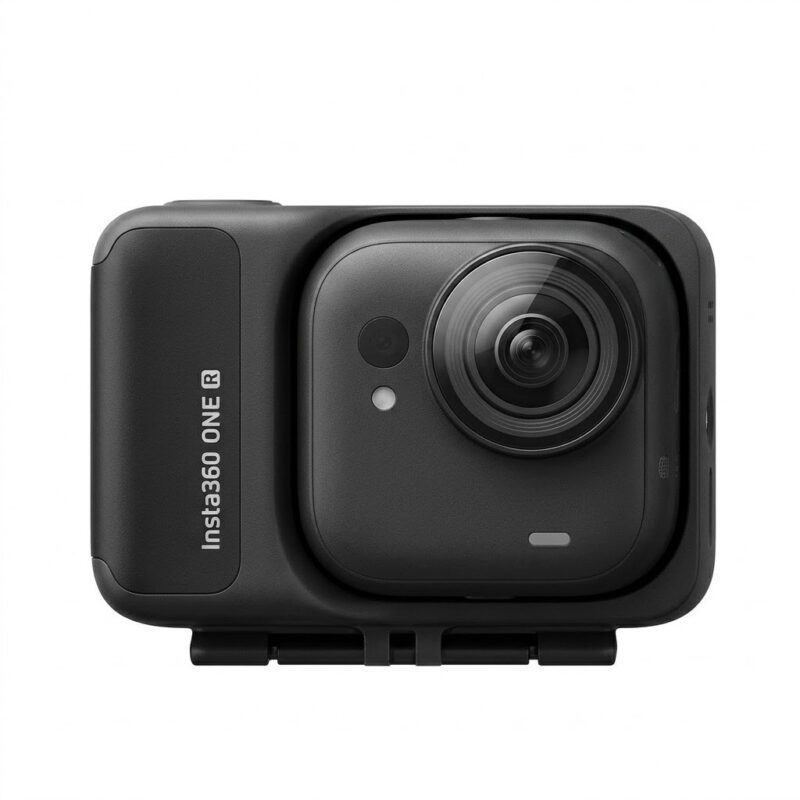
Why Did the Shape Change?
The GO Ultra moved from the oblong pill shape of the GO 3S to a square form factor. The square shape is 53 grams compared to 39 grams for the GO 3S. Some existing GO series users initially find the shape change surprising. However, the square form provides more stable and balanced mounting on flat surfaces and improves weight distribution on the pendant and other accessories during movement.
How Does the Magnetic System Work?
The rear surface of the camera module is magnetic. This allows it to attach directly to metal surfaces for instant creative mounting. The included magnetic pendant clips to the front of a shirt or jacket. Additionally, Insta360’s quick-release mounting system ensures full compatibility with the existing GO accessory ecosystem from previous generations.
What Is the Action Pod Screen Like?
The Action Pod’s flip-down touchscreen measures 2.5 inches. This is larger and brighter than the GO 3S pod’s 2.2-inch screen. It shows live preview, recording status, mode information, and all camera settings. Furthermore, three dedicated physical buttons for shutter, power, and quick mode switching reduce the need for touchscreen navigation during active shooting situations.
How Easy Is It to Detach the Camera?
The camera module separates from the Action Pod with a single button press. Once detached, it operates as a standalone recording unit. This separation allows the camera to fit in tight mounting positions. Additionally, the pod continues charging the camera module battery when they reconnect after a standalone recording session.
Is the GO Ultra Waterproof?
The Insta360 GO Ultra has waterproofing capability, though specific IP rating details apply primarily to the complete unit with protective housing accessories. The magnetic pendant and Action Pod combination handles light rain and splashes confidently. For underwater sports or deeper water environments, the optional dive case accessory provides the necessary level of protection.
What Colors Are Available?
The GO Ultra comes in Midnight Black and Arctic White. Both finishes share identical internal specifications. The Arctic White version is particularly popular among creators who use the camera in frame, as its clean color creates less visual distraction than the black finish in POV footage compositions.
Battery and Connectivity
How Long Does the Camera Module Last Alone?
The camera module battery delivers approximately 70 minutes of recording in standalone mode. Real-world testing suggests approximately 40 to 50 minutes under continuous high-resolution recording conditions. However, the 12-minute fast charge to 80% makes quick recharging between shooting sessions genuinely practical for everyday active use.
What Does the Action Pod Add?
With the Action Pod attached, total runtime reaches approximately 200 minutes. This extended life covers full-day activity sessions for most creators comfortably. Furthermore, the pod’s 1450mAh battery charges to 80% in just 18 minutes. This fast charging speed supports intensive multi-session shooting days where downtime must be minimized.
Why Does MicroSD Matter?
The most important connectivity upgrade over the GO 3S is microSD card support. The GO 3S recorded to internal memory only. This created significant workflow friction for high-volume shooters who needed to transfer all footage before continuing to record. The GO Ultra accepts microSD cards up to 2TB capacity. Consequently, creators can capture full-day shoots and transfer files efficiently without any internal storage limitations.
How Does App Integration Work?
The Insta360 app handles all advanced editing and sharing features. AI-powered highlight detection identifies the best moments from long recordings automatically. Auto-editing tools create shareable clips with music and transitions from raw footage. Additionally, the app controls all camera settings wirelessly when a phone connects to the GO Ultra’s built-in Wi-Fi network.
Real-World Use Cases
Fitness and Sports POV Content
The GO Ultra’s primary use case is wearable POV recording during physical activity. The magnetic pendant clips to a shirt or jacket and records uninterrupted hands-free footage throughout any activity. Running, cycling, swimming, skiing, and team sports all produce compelling content with this approach. Furthermore, FlowState stabilization keeps footage smooth despite the natural body movement that occurs during active physical effort.
Parenting and Family Memory Creation
Parents attach the GO Ultra to clothing during family activities and let it record passively throughout the event. The tiny size and lightweight design make it completely unobtrusive during theme parks, beach trips, and family gatherings. Additionally, the AI editing tools in the app create shareable highlight videos automatically from long footage files without any manual editing required.
Pet Filming and Animal POV
The tiny camera module attaches to pet collars and harnesses for pet-perspective footage. Dog walks, park visits, and indoor play sessions produce footage from angles that no handheld camera can replicate. Furthermore, the 156-degree wide angle captures broad environmental context from ground level where animals actually experience the world.
Travel and Lifestyle Vlogging
Travel creators use the GO Ultra as a small supplement to their main camera system. It captures incidental B-roll, ambient environmental footage, and POV perspectives without requiring the creator to hold a camera actively during activities. Additionally, the FreeFrame open-gate recording produces both horizontal travel vlogs and vertical social content from the same recorded file.
Cycling and Bike Commuting
The GO Ultra mounts to bike helmets, handlebars, and frame tubes easily via magnetic mounts or included adapters. Cycling footage benefits enormously from FlowState stabilization which handles road vibration and uneven terrain smoothly. Furthermore, the 70-minute standalone battery life covers most cycling commutes and recreational rides without requiring the Action Pod attachment.
Pros and Cons
Pros
The 1/1.28-inch sensor represents a 221% increase over the GO 3S and delivers noticeably better image quality in all lighting conditions. MicroSD card support up to 2TB completely solves the GO 3S’s most significant practical limitation. The 4K at 60fps capability handles fast-motion content reliably and smoothly. Additionally, the 12-minute fast charge on the camera module is among the fastest in the action camera category. FreeFrame open-gate recording provides flexible post-production delivery options for multiple platforms. The 53-gram camera module remains genuinely light enough for wearable use without physical fatigue. Furthermore, the 200-minute combined battery life with Action Pod covers full-day shooting sessions comfortably without management anxiety.
Cons
At $449, the GO Ultra costs more than many larger and more capable integrated action cameras including the DJI Action 5 Pro. The Ace Pro 2 at the same price delivers sharper footage in challenging low-light scenarios according to multiple independent side-by-side tests. The new square form factor is physically larger and heavier than the original GO series pill shape, which disappoints some existing GO users. Additionally, Active HDR mode is limited to 4K at 30fps only, which reduces its usefulness for high-frame-rate capture needs. Furthermore, specific waterproofing ratings for the standalone camera module without protective housing accessories are not fully confirmed in available documentation.
Final Verdict
The Insta360 GO Ultra is an impressive and capable upgrade over the GO 3S in every measurable dimension. The larger sensor, microSD support, 4K at 60fps video capability, and fast charging all make it the most complete tiny action camera Insta360 has ever produced. For any existing GO series user, the upgrade path is clear and justified.
However, the $449 price demands honest competitive context. The Ace Pro 2 at the same price delivers better raw image quality in challenging conditions. The DJI Action 5 Pro costs less and offers comparable performance in a traditional integrated form factor.
The GO Ultra makes perfect sense for creators who specifically need the tiny wearable form factor, magnetic mounting versatility, and modular operation flexibility. If the form factor is the deciding priority, nothing else in the market matches it at this performance level currently.
Read More from AltBuzz
Read more from Altbuzz for camera reviews, rumors, and detailed specs. AltBuzz delivers trusted and easy-to-understand photography content.
Subscribe AltBuzz YouTube Channel
Stay updated with camera reviews, rumors, and comparisons. AltBuzz shares regular camera content.